Thursday, July 7, 2011

iPhone Movie Night Out Does the Planning

NCM Movie Night Out App Launches for iPhone, Android

Free App Helps Users Plan an Entertaining Night Out Before, During and After a Movie

CENTENNIAL, Colo.--NCM Media Networks, a leading integrated media company reaching U.S. consumers in movie theaters, online and through mobile technology, debuted its free Movie Night Out application for Apple® iPhone®, iPod touch®, Android™ mobile devices early this summer.
NCM’s Movie Night Out app helps users plan that perfect movie night out on the town. With a feature-rich interface, Movie Night Out can help recommend a movie based on the kind of evening a user has in mind, with suggestions on what to do before and after the film. Movie lovers can take in reviews, watch trailers, search showtimes and theater locations, and buy tickets directly from the app through links to Fandango or theater circuit websites. Then, with Citysearch reviews and recommendations, Movie Night Out can also help users choose where to do their pre-movie shopping, have dinner, or even buy flowers for their date, and then finish the night out with dessert or getting together with friends at a local club.
Movie Night Out lets users find what’s playing nearby and now, filter movies by genre, rate and review movies, and save their plans. With full Facebook, Twitter, and Foursquare functionality, users can also keep lists of movies they want to see, see their friends’ lists, and share their plans and reviews with friends. Be it a first date or a night out with the family, Movie Night Out helps plan it all.
The free Movie Night Out app is available for download from the App Store or through the Android Market.
“Going out to the movies is a social event, and people like to make an entire evening out of it. Our new Movie Night Out is a truly platform-agnostic app that gives users a way to pick a movie, theater and plan their entire evening, all from their mobile device,” said Ken Venturi, chief creative officer and executive vice president of interactive media with NCM Media Networks. “That old favorite – dinner and a movie – just got a whole lot easier!”
For more information on the Movie Night Out app, visit www.movienightout.com.

Wednesday, July 6, 2011

Shooger Shopping Deals For iphone and ipad

New Shooger Mobile Network Uses the Power of the Crowd to Put Sweet Deals in the Palm of Your Hand
Community-Driven Mobile Deal-Hunting Network Helps Consumers Live the Sweet Life with Insider Information on the Best Local Deals

Miami, Fla. (June 2011)—Everyone loves a great deal, but sometimes the best offers are well-kept secrets - you have to know someone on the inside in order to get the scoop. With the new Shooger mobile app launched today, anyone can be an “insider” with free, instant access to the most vibrant network of deal hunters in the world.

Unlike group-buying deal sites that operate on tipping point models and advertiser-backed promotions, Shooger gives mobile and web users the ability to find and share sweet deals instantly with the entire Shooger community. The app is free to download and there’s nothing to buy in advance to access Shooger deals. Shooger is exclusively designed for the mobile experience, featuring hyper local deals, limited-time-only discounts, special promotions you must know to ask for, product recommendations and tips, like which salesperson to talk to at the store.

“The best deals have always been the ones you hear about from your friends.  Shooger is like having a whole bunch of deal finding friends sharing their tips with you” said Donick Cary, Executive Producer of Shooger and Emmy winning writer from “The Late Show with David Letterman” and “The Simpsons." “You can follow real people and their real deals – It’s a great big mobile reality show that saves you money. “

Shooger is building a highly engaged and active user base that scouts for great deals and shares them with the network. This unique community works together to help save time and money and get the inside information on the best offers all across the country. Shooger’s sweet deals are constantly updated, so there are always fresh deals to be found in your neighborhood. A simple search lets you browse deals by category or based on your location.

“Some of the best deals around never see the light of day - they’re not advertised in the newspaper or showcased on a store sign. You have to know who to ask,” said Milen Mishkovsky, Shooger’s CIO. “With Shooger on your smartphone, you’ve got instant access to exclusive information, no matter where you are.”

The savviest Shooger deal-finders can become Shooger Experts, posting deals and creating their own channel around specific categories of interest or in specific geographic locations. For example, a nutrition guru might become the Shooger Expert on sales of organic food products. Or, the fashionista could become the local Shooger Expert sharing the best clothing and accessory deals in her neighborhood. Shooger Experts are tastemakers and community leaders, helping to curate the vast amount of deals generated by Shooger users.
           
“There’s no doubt that we are in the middle of a consumer revolution—the way people shop and make purchase decisions has changed dramatically with the ability to tap into the community for resources and referrals,” said Alex Stancioff, CEO of Shooger.

Shooger’s latest version is available now on the iPhone, with Android and BlackBerry versions coming. To download Shooger now and tap into the sweet life, search for Shooger in the Apple App Store or visit www.shooger.com.

About Shooger
Shooger is a crowdsourced deal-hunting network designed specifically for the mobile experience, bringing the power of the community to the palm of your hand to help you find great deals on products, services and more, wherever you live or travel. Free to download and use, Shooger leverages location-based tagging with user-generated content to deliver a dynamic community where users work together to help one another save time and money and live a sweeter life. Shooger is privately funded and headquartered in Miami, Fla. For more information, visit www.shooger.com.

Iphone App Makes Packing and Travel Easy

Iphone App Makes Packing and Travel Easy


New iPhone app aims to relieve the stress of packing for holidays

Saving Grace from Grace hotels is a packing tool and travel reminder

Leading psychotherapist Lucy Beresford confirms that packing and planning holidays is a prime source of family stress

Free app comes with ready-made packing lists by holiday type

New York, NY (June 15, 2011): International boutique hotels group, Grace Hotels has launched an iPhone app specifically designed to take the stress out of packing for holidays. The company sees packing as a notorious source of anxiety that can potentially spoil the excitement of getting away. “When we talk to holidaymakers” says Philippe Requin, CEO of Grace Hotels “we find that all too often the burden of responsibility for packing ends up with one member of the family – typically wives and mothers. But we feel that thinking for the whole family is too much to ask of one person. So we have developed Saving Grace – an iPhone app that does the thinking and remembering for you.”

Saving Grace by Grace Hotels is a packing check list and task reminder tool all in one. The app has pre-set lists for different trip types - winter, summer, activity holiday or a short break. Activities include specific lists for surfing, cycling, golf, diving, fishing, camping etc.

Users can personalise lists by deleting pre-set items or adding their own items. Once a packing list has been built and saved it can be renamed and used over and over again. Saving Grace makes packing easier by showing not only how many items have already packed, but also how many are left to pack.


The app also features a readymade list of important things to do before you travel - from travel insurance to currency to watering the plants and emptying the fridge.

Psychotherapist and broadcaster, Lucy Beresford added: “There is often the hope or expectation that holidays must be perfect, so our packing must be perfect too. Going on holiday often means leaving our comfort zone, so we long to be prepared for all eventualities while away. Packing also resembles a nesting process, which is how we make ourselves feel safe and secure; so we try to repeat that sense of safety and security in our packing. Holidays break our routine, which can cause anxieties, so packing becomes a displacement activity to offset these anxieties: packing ceases to be about taking the right clothes and more about who remains in control. But if you’re the one taking control, the pressure is on you alone not to forget anything."

iPhone users can download Saving Grace from the Apple App Store now, free of charge. See http://itunes.apple.com/gb/app/saving-grace-travel-packing/id441237653?mt=8

Tuesday, June 7, 2011

How To Remove The Recovery Virus

How To Remove The Recovery Virus


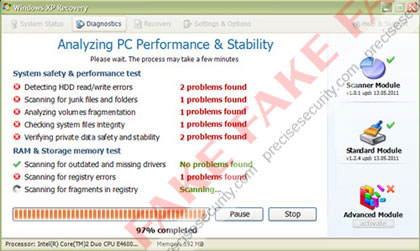
The Windows XP 'Recovery' is a malware program that is widely infecting computers under the guise of system optimization software. Windows XP Recovery will install itself on Windows XP, Windows Vista, and Windows 7 computers providing false system information. It's purpose is to deceive computer users into purchasing a licensed full version version of the program. Once loaded on to the computer, this product will launch a system scan and warn of hard disk drive errors, junk files and folders, numerous registry errors, and several outdated drivers. All are false and do not exist on the system.
To further scare computer users into purchasing the full version of Windows XP Recovery, it will flood the computer with system task bar. All attempts to fix these errors will refer user to a payment web site where credit card account will be processed. The full version (paid version) will not repair the errors. This software was developed solely to steal money from innocent victims.

Windows XP Recovery Removal Procedures

Manual Removal:
Booting 'Safe Mode with Network Support' is the best option to start the removal process.

Press Ctrl+Alt+Del on keyboard to stop the process “Windows XP Recovery”.
When Windows Task Manager opens, go to the 'Processes' Tab and find and end the following process:
(example: 2354568.exe (typically some random characters).exe

2. Update your antivirus to the latest database signatures.
3. Thoroughly scan your computer and remove all threats.
4. All Windows XP Recovery registry entries deleted. See below for entries associated to the rogue program.
5. Exit registry editor.
6. Clean startup of Windows XP Recovery as follows:
Start > Run, type msconfig on the “Open” dialog box. 'Windows System Configuration Utility' will launch. navigate to the Startup tab, un-check the following Start-up item(s):
(example: 2354568.exe (typically some random characters).exe

7. Click Apply, reboot

Windows XP Recovery Removal Tools:

To completely remove the Windows XP Recovery, download and run Malwarebytes Anti-Malware. In the event Windows Xp recovery blocks the installation of Malwarebytes Anti-Malwar (MBAM). You will need to download it on another computer, and rename the EXE extension to anything other than exe. Copy it to USB and run it on the infected computer.

Portable (USB) SuperAntiSpyware:

A thorough scan can be run from USB with SuperAntiSpyware Portable Scanner

Windows XP Recovery Registry Edits

Windows XP Recovery Malware Entries
%AllUsersProfile%\[random].exe
%AllUsersProfile%\[random].dll
%UserProfile%\Start Menu\Programs\Windows Recovery\Windows Recovery.lnk
%UserProfile%\Start Menu\Programs\Windows Recovery\Uninstall Windows Recovery.lnk
%UserProfile%\Start Menu\Programs\Windows Recovery\
%UserProfile%\Desktop\Windows Recovery.lnk
%AllUsersProfile%\Application Data\.exe
%AllUsersProfile%\Application Data\.dll
%Programs%\Windows XP Recovery\Windows XP Recovery.lnk
%Programs%\Windows XP Recovery
%Desktop%\Windows XP Recovery.lnk
%TempDir%\dfrgr
%TempDir%\dfrg
%TempDir%\[random characters].exe
%TempDir%\[random characters]
Windows XP Recovery Registry Entries:
HKCU\Software\Microsoft\Windows\CurrentVersion\Run “[random characters].exe”
HKCU\Software\Microsoft\Windows\CurrentVersion\Run “[random characters]“

Wednesday, June 1, 2011

SONOS ADDS TWO FREE GLOBAL RADIO SERVICES

SONOS ADDS TWO FREE GLOBAL RADIO SERVICES TO THE HOME LISTENING EXPERIENCE

AUPEO! And Stitcher SmartRadio Now Playing on Sonos

SANTA BARBARA, CA – June 1, 2011 – Sonos, the leading developer of wireless music systems for the home, today took another step in streaming all the music, radio, news and podcasts on the planet by adding two innovative and global radio services to the Sonos experience - AUPEO! Personal Radio and Stitcher SmartRadio™. 

Beginning today, all Sonos customers around the world can tune in to these services for free by simply registering at www.AUPEO.com/Sonos or www.stitcher.com.  After registering, go to the Music Menu on any Sonos Controller, touch More Music and add the service to Sonos.  

“Our goal at Sonos is to continuously connect our customers with all the music and radio on the planet,” said John MacFarlane, CEO, Sonos, Inc. “Providing them with two free, innovative radio services like AUPEO! and Stitcher enhances their listening experience and increases their entertainment choices at home.”

AUPEO! Personal Radio
AUPEO! Personal Radio, now free with every Sonos system, is an Internet radio platform that lets you stream music for free and offers an excellent music discovery experience. Build your personal radio station starting with a music genre and influence it with “Love” and “Ban” buttons – you´ll only get music you really like!  Choose from 100+ expertly crafted Genre Stations, search for a specific artist on Artist Radio or tune your Personal Radio with the one-of-a-kind Mood Selector to match your mood.  Plus, AUPEO! is offering all Sonos customers a free 14-day trial of AUPEO! Premium, which features ad-free listening and  higher streaming audio quality. 

Stitcher SmartRadio
Stitcher SmartRadio, now free with every Sonos system, is a podcast and Internet radio service that streams all of your favorite podcasts and radio shows, on-demand with no need for downloading or syncing. Choose from more than 5,000 shows in news, comedy, sports, talk, and entertainment from brands as diverse as NPR, CNN, Fox, BBC World Service, TechCrunch headlines, Adam Carolla and more. You can even personalize your listening experience by “stitching” together your favorite shows to create your own customized playlist and also discover new shows based on your past listening preferences.

For more information about Sonos or to locate an authorized Sonos dealer in your area, please visit www.sonos.com or call 877.80.SONOS.

About Sonos, Inc.
Sonos® is the leading developer of wireless multi-room music systems for the home. The Sonos Multi-Room Music System is the first, wireless multi-room music system that lets you play all the music you want all over your house – and control it all from the palm of your hand.  Sonos liberates the music stored on a computer so it can be enjoyed all over the house.  In addition, by partnering with audio services like AUPEO, Deezer, iheartradio, Last.fm, MOG, Napster®, Pandora®, Rdio®, Rhapsody®, SiriusXM Internet Radio, Spotify, Stitcher SmartRadio™, TuneIn, Wolfgang’s Vault, and more, Sonos gives music lovers instant, computer-free access to millions of songs, thousands of radio stations, audiobooks, and more.  The award-winning Sonos Multi-Room Music System is available at more than 6200 retailers in over 65 countries worldwide; or direct from Sonos at www.sonos.com.  Sonos is a privately-held company, headquartered in Santa Barbara, CA with offices in Cambridge, MA, Hilversum, Netherlands, Shenzen, China, and Penang, Malaysia.

© 2004-2011 by Sonos Inc. All rights reserved. Sonos is a Registered trademark of Sonos, Inc. in the U.S. and other countries with pending trademark registrations worldwide. SonosNet, ZonePlayer, ZoneBridge and all Sonos logos are trademarks of Sonos Inc. in the United States and other countries. All other products and services may be trademarks or service marks of their respective owners.