Tuesday, October 26, 2010

SONOS Wireless Ipod Dock


SONOS Wireless Ipod Dock Is Now Available

New accessory wirelessly streams digital music from iPod or iPhone to every room of the home


SANTA BARBARA, CA – October 26, 2010 –
Sonos, the leading developer of wireless multi-room music systems for the home, today announced that the Sonos Wireless Dock (WD100), an accessory to the award-winning Sonos Multi-Room Music System, is now available for purchase.  The Sonos Wireless Dock is available for $139 at all Sonos authorized retailers and at www.sonos.com.
With the Sonos Wireless Dock, you can now play all of the music from an iPod or iPhone in every room of the house while simultaneously charging your device. Unlike most iPod docks on the market  which use the iPod’s analog interface, the Sonos Wireless Dock sends your digital music files wirelessly to ZonePlayers throughout your home via the iPod’s digital interface—without ever converting to analog.  The all digital path preserves the sound quality from the iPod to the speaker and when combined with Sonos’ outstanding wireless performance, ensures you get the highest fidelity sound.
You can wirelessly play what’s stored or playing on an iPod or iPhone, including most iOS music apps, on any or all Sonos ZonePlayers.  Browse and select the music from either your docked device or any Sonos Controller, even another iPhone or iPod Touch.  And, you can play the same song from a docked iPod or iPhone in every room – perfectly synchronized. 
“The Sonos Wireless Dock is the perfect accessory for our music loving customers who own an iPod or iPhone so they can play that music in any or every room of the home,” said Phil Abram, President, Sonos, Inc.  “This new accessory reinforces our mission to provide our customers with access to all of the music on the planet, including everything available on their iPod or iPhone.”
The Sonos Wireless Dock is compatible with the following devices: iPod touch (1st, 2nd, and 3rd generation), iPod classic, iPod nano (3rd, 4th, and 5th generation), iPhone 4, iPhone 3GS, iPhone 3G and iPhone, and has been certified under the Made for iPod program to meet Apple performance standards. The Sonos Wireless Dock supports Apple’s 1Amp charging specification so your iPod or iPhone are ready to go when you are.
For more information about the Sonos Wireless Dock or to locate an authorized Sonos dealer in your area to demo the new accessory, please visit www.sonos.com.
Wednesday, October 20, 2010

How to Copy DVD's to Mobile Phones

How to Copy DVD's to Mobile Phones


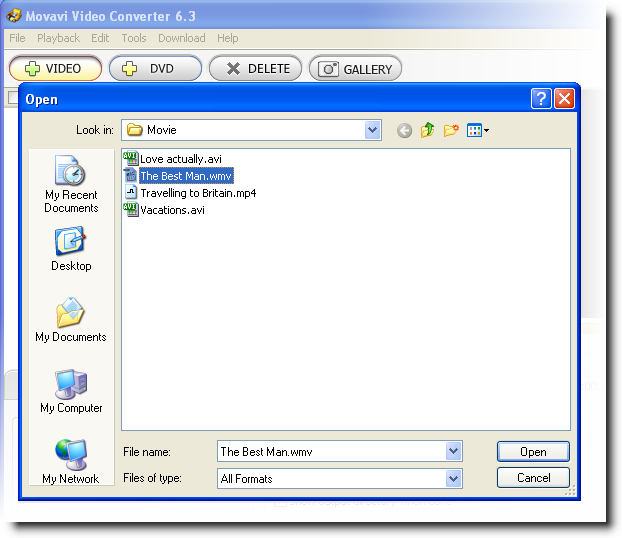
Using Movavi Video Converter, you can rip unprotected DVDs and save them in the 3GP format to be played on mobile phones and 3GP players. You can either convert a whole DVD disc at once or work with separate titles. The procedure of DVD ripping takes just a few moments - you will really like the speed and the program's clear interface. Additional tutorial details can be found here.

Wednesday, September 22, 2010

Avoiding Gmail Spoofing and Phishing

The Latest Attempts in Gmail Account Spoofing and Phishing

typical gmail 'phishing' warning

First and foremost - Google will never ask you for any personal information. (As highlighted below in red)
If there is a problem with your gmail account, you will be prompted when you login. You may be required to re-verify your account using your phone number on file, which will result in an automated phone call with a pin number. This phone call will come immediately, and will show as Google in your caller ID.

Any other methods to obtain information about your google account are completely false ad are an attempt to spoof\phish your gmail or google account.

A typical google spoof\phishing attempt is below:

(this is a copy and paste of a typical gmail phishing attempt.) 


Dear User,

We are sorry to inform you that we are currently working on securing our server, during this process account which is not manually

verified by us will be deleted, Please confirm and submit your information for manual verification by one of our customer care.

Information which is to be provided is below:
User Name:
User Id:
Password:
Date Of Birth:
Country (At Sign up):

Upon confirmation of information from you, we will manually verify your Gmail! Account and reserve it not to be deleted, We are

sorry for any inconveniences this might have cause providing  your information over the email.

Warning!!! Account owner that refuses to update his/her account after two weeks of receiving this warning will lose his or her account

permanently.
______________________________________________________________________________

Copyright © 2010 Gmail! Inc. All rights reserved. Copyright/IP Policy |Terms of Service | Guide to Online Security

NOTICE: We collect personal information on this site.

To learn more about how we use your information, see our Privacy Policy.

Tuesday, September 21, 2010

Easily Watch TV Shows

The new 2010 TV season is upon us and one of the biggest problems viewers experience is finding a way to watch all their favorite shows. Unless, of course you have PVR, or your cable provider offers on demand service. If no to the above 2 options, then you are out of luck right? Wrong! There are other alternatives and sources to watch all your favorite tv shows - all the time. Not to mention games and movies.

The blog NZB TV Show Downloads has a great article on how to do this. Follow this link to read the full tutorial.

Thursday, September 9, 2010

Download Youtube Videos with ease

One of the biggest complaints about youtube is the inability to download videos for viewing offline, or on a portable device. For the average youtube user, it is a difficult task. Even for the the experienced computer user, there are many methods, however no simple 1 click, 1 stop solution to to this.

Fortunately, FLVTube has solved the problem with their 'FLVTube' product. With FLVTube, you can easily downoload, save and watch your favorite youtube videos anytime.

Download Youtube Videos Easily!