Wednesday, June 13, 2012

SPAM Me Not!

SPAM Me Not!

Spam, ahh, such a lovely thing to look forward to is it not? I'll bet if a poll was done about all things 'Internet' spam would be number one of the most hated list. Everyone gets it, everyone hates it, the question is how to deal with it. In many cases your email address is on a list.
 
That list was built either by someone scouring the internet and finding your email somewhere deep on a comment in a forum, or from a ebay purchase, or from a picture you shared somewhere years ago. Lists and email addresses are bought and sold as well by marketing companies, they are bought and sold by those that use 'questionable' methods to make money on the Internet)
 
Some feel that if you're dumb enough to fall for an internet scam, then hell yeah, They are going going to make a few bucks from you. Anyway, the point is your email address is on a list and you will never get it off that list because it's just too hard and time consuming to track it down.

SPAM Housekeeping
The simplest method is to create a filter that scans an email message for the word 'unsubscribe'. All email subscriptions are supposed to have a unsubscribe link within them, this can be used to filter out unwanted email subscriptions. You can then have those emails automatically marked as spam, or you can click the unsubscribe link within the email. The filter method is not perfect however and will often capture some good emails. 

The 'best' method is to simply stop using that email address and advise your contacts that you are using a new email address. Sort of like moving, however if you are like many of us, our primary email address is not easily abandoned. In other words, that is not an option. So what are we to do? One viable solution is to utilize a new unsubscribe feature in gmail that allows you to unsubscribe from emails lists. Gmail scans email messages for certain patterns and senders that it deems as a email list.
  
Gmail can automatically unsubscribe you from email subscriptions and other list. 

Going one step further are several 3rd party websites that use gmail's new feature, however they go a little further. 

Help is Here!

Unroll.me makes managing your subscription list easy. Simply select the emails that are overloading your inbox, and we'll automatically unsubscribe you all at once. If you change your mind, there's always time to reselect a subscription. Plus your privacy is our top priority. We don't even peek at your personal emails (promise). unroll.me faq

Unsubscribr makes things a little easier as long as you have Gmail, Google Apps, Yahoo! Mail, or AOL Mail. You simply type in your email address, grant permission to the unsubscribr, and it then scans and provides a link to unsubscribe. Unsubscribr doesn't have access to your email password as long as your email client supports it. The service is free, however it only scans up to five days of past mail. You can upgrade and pay a one-time fee of $2 to clean out 30 days worth of mail.

Last but not least is unsubscribe.com
Just install it in your email account, and any time you want to unsubscribe from a marketing email, you just hit the “Unsusbcribe” button and the service takes care of the rest.


Tuesday, April 3, 2012

Never Trust a QR Code

Never trust a QR Code


In a followup to my previous article 'What Are QR Codes
The QR code has evolved into something more functional, something smarter... something malicious even!
No longer are these funny looking black and white squares only for websites, to download special apps or give us coupons or promotions.

Now, QR Codes are among the newest threats to mobile devices. The threat itself is called "Attaging" or Attack Tagging. which is done by spoofing QR codes. The smartphone user will scan and access a QR code, however it has been modified to deliver the user to some sort of malicious site, or content. Hackers simply replace a QR code on an advertisement (maybe a drive through menu sign?) that could lead to malware, Trojans or viruses.

Once you have You have to scanned it, you are at the mercy of the code. it may lead to a website that looks totally legitimate, however it's secretly uploading a trojan to your smartphone in the background. It infects  your smartphone and sends SMS messages to a pay service, or something that charges your smartphone account. Unfortunately, you won't see it until the bill comes in.

This is called an 'SMS Trojan' which is a very popular A common method to generate income via malware on a mobile device.

More seriously though, is exploits that try to 'root' a smartrphone. This enables a hacker to have full administrative access to your smartphone. This is the same (and in some cases beyond) as an administrator would have access to a network, or a device. The 'root' access allows unrestricted access, so just about anything can be done that device without any restrictions, or safeguards. The smartphone can be erased, data stolen - even uploaded to someone else. Your contacts, address book, personal information - even the serial number (EMEI) number of your smartphone can be identified and even cloned. (This could mean a whole bunch of people using your same EMEI number to make calls, send SMS, purhase products etc.) All on your dime.

The best advice when using QR codes - if the advertiser has a website printed on their advertising along with a QR code, make sure it matches the product in some way. if you are unsure or have any doubt. Don't scan the QR code!

Tuesday, December 13, 2011

Stream TV To Anything!

Stream TV To Anything!

Hauppage's Broadway (MSRP $199 USD) lets you stream TV to any device. This includes all apple iOS devices, and even Android devices (anything that can use flash) All you need is a web compatible device that can open a web page. Hauppauge is a leader in TV gadget technology, and has been around since 1992, so they always have something on the 'must have' list! This is no exception!

All that is required to use Broadway is a cable TV or satellite feed and an internet connection. Hauppage's Broadway connects to your TV's signal first, then through Broadway, it converts the TV signal to wireless for reception by your device(s). Once connected via Ethernet, simply visit the configuration website and start the process.

Simplified, the Broadway device lets you watch anything you can watch on TV - on a portable device. Additionally, you can watch anything anywhere, using WiFi and an internet connection. From a hotel room, a coffee shop, or via mobile device. Broadway determines the type of device it is sending video to, and changes the video format depending on the device type.

The Broadway device also contains a TV tuner that supports cable\satellite set top boxes, ATSC 'over-the-air' TV signals, and unencrypted digital cable TV (clear QAM). Cable TV\satellite set top boxes connect to Broadway audio\video send and then controlled from your Apple\mobile device. You then have full control of the TV channel selected on the set top box via Broadway's "IR-blaster" technology. 


Broadway offers high definition H.264 video encoding which converts your TV signal into a compatible format for Apple, Android or PC and Mac. All that is needed is an internet connection and a web browser (Safari, chrome, firefox or IE)


Setting up Broadway is as easy as this;
  • Connect your TV source to Broadway: cable TV or satellite set top box, antenna or TV coax cable
  • Connect Broadway to your home router (Wi-Fi or wired)
  • Open a browser on your Apple device and type in http://distan.tv
Broadway's distan.tv server makes the setup of Broadway a snap! You can now scan for TV channels and set up an Internet connection to your Broadway device. If you have problems, you can even use their install guide.

Friday, November 18, 2011

Christmas Classics On Blu-Ray

Christmas Classics On Blu-Ray
The Original Christmas Classics has arrived on Blu-ray box set. The box set contains four of the most beloved holiday TV specials of all time, including the Rankin/Bass classics “Frosty the Snowman,” “Rudolph the Red-Nosed Reindeer,” “Santa Claus is Comin’ to Town” and “Frosty Returns
These iconic TV specials are part of the Canadian and US holiday tradition, just like baking cookies or trimming the Christmas tree!  The holiday season just wouldn’t be the same without them…and many of continue to watch these each and every year! I know I still do!

The Original Christmas Classics box set will be available wherever Blu-rays are sold for $44.99 SRP.
  
VeggieTales The Little Drummer Boy
 
Also being released for the 2011 holiday season is an all-new VeggieTales holiday-themed DVD, VeggieTales The Little Drummer Boy. The title is a heartwarming tale that retells the classic The Little Drummer Boy story. The DVD offers a timeless message of hope during the holiday season, and will feature multi-Grammy and Dove Award-winning artists BeBe and CeCe Winans, singing their version of the iconic “The Little Drummer Boy” song.
DVD Synopsis
In this Veggie-version of a holiday classic, Junior Asparagus stars as The Little Drummer Boy, a lonely child who finds the true meaning of Christmas when he stumbles upon the birth of the baby Jesus. A story of generosity, hope and love, this timeless tale will warm the hearts of children everywhere!

Bonus Features:
  • Audio Commentary
  • “The Little Drummer Boy” Music Video
  • Sing-Along Songs—“The 8 Polish Foods of Christmas” and “Can’t Smile Without Ewe”
  • Behind the Music of “The Little Drummer Boy”
  • Visit a Drum Factory with Junior
  • Family Activity—Make Your Own Drum
  • Interactive Book Preview—Christmas Is Finally Here

Friday, October 21, 2011

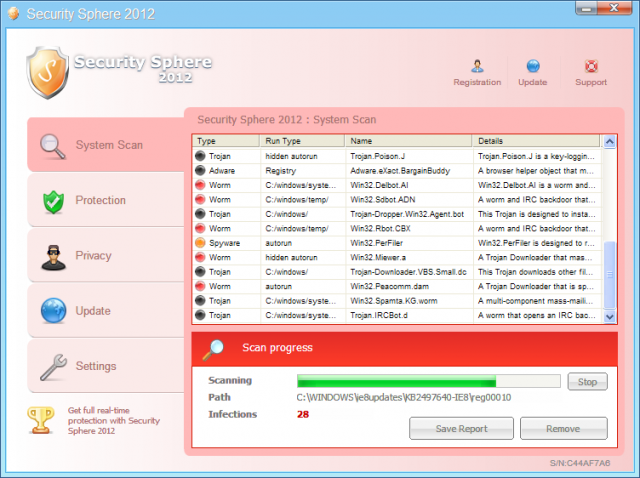
How To Uninstall Security Sphere 2012

How To Uninstall Security Sphere 2012

Security Sphere 2012 is a computer malware similar to 'Security Shield'. This malware is a rogue anti-spyware program that poses to be legitimate security program. Security Shield is actually a program that displays false security results and false alerts about the state of your computer. In addition, it hijacks your computer so that you cannot run any applications.

Security Sphere 2012 is installed silently through visits to hacked web sites, exploits, and fake online scanners. Sometimes Security Shield and other similar malware programs are downloaded simply by visiting sponsored sites within google search results. Once installed, the infection randomly creates folders on C:\Documents and Settings\All Users\Application Data\, in (Windows XP), or C:\ProgramData, on (Vista and Windows 7) systems. It is then be configured to start automatically when you login to your computer. 

To remove Security Shield 2012, simply follow these steps:

- Reboot your computer into Safe Mode with Networking. To do this, turn your computer off and then back on and immediately when you see anything on the screen, start tapping the F8 key on your keyboard.Using the arrow keys on your keyboard, select Safe Mode with Networking and press Enter on your keyboard. Windows will now boot into safe mode with networking and prompt you to login as a user. make sure to login as the same user you were previously logged in with in the normal Windows mode.

When in Safe More with Networking, we must first end the processes that belong to Security Sphere 2012 so that it does not interfere with the cleaning procedure. To do this, please download RKill to your desktop from the following link.

RKill Download
Once RKILL is downloaded, double-click on the iExplore.exe icon in order to automatically attempt to stop any processes associated with Security Sphere 2012 and other Rogue programs. When RKILL has finished,  you will then be able to proceed with the rest of the guide. Do not reboot your computer after running RKill as the malware programs will start again.If you continue having problems running RKill, you can download the other renamed versions of RKill from the RKill download page. Both of these files are renamed copies of RKill, which you can try instead. Please note that the download page will open in a new browser window or tab.
Now that the program has been terminated, you have to remove its associated files from the pc.

Kill processes (using rkill):
[ransom].exe

Delete registry values:
HKEY_CURRENT_USER\Software\Microsoft\Windows\CurrentVersion\RunOnce "[ransom].exe"


Delete files:
%AllUsersProfile%\[ransom].exe


Delete directories:
%AllUsersProfile%\[random]


Now reboot your computer.